This post is a translated VMware blog post by Swathi Prabhu from March 13, 2020.
The original post is unfortunately no longer available. It describes the architecture of vRealize Automation 8.1. The term vRealize Automation (vRA) has been updated in the text to VCF Automation.
VCF Automation Architektur
Eine auf Containern basierende Microservices-Architektur bietet eine vereinfachte Verwaltung, Konfiguration, verbesserte Leistung und Skalierbarkeit. VCF Automation wurde neu gestaltet, um diese moderne containerbasierte Architektur zu unterstützen. Als Ergebnis kann es besser skalieren und die Möglichkeit seiner Kunden verbessern Multi-Cloud-Umgebungen bereitzustellen und zu verwalten. VCF Automation Services können auf einer einzelnen virtuellen Maschinenumgebung ausgeführt werden, die die meisten Kundenanforderungen erfüllt, und lassen sich leicht auf eine Cluster-Konfiguration mit drei Knoten skalieren, um die Rechenressourcen der virtuellen Maschinen zu erhöhen. VCF Automation überwindet auch die Notwendigkeit, Teile der Architektur auf einem Windows-Server auszuführen, wie dies bei früheren Versionen der Fall war.
Moderne Plattform mit Kubernetes-basierter Micro-Services-Architektur
Die VCF Automation Appliance wird mit Photon OS 4.0 betrieben und verfügt über natives Kubernetes (K8S), das auf dem Betriebssystem installiert ist, um containerisierte Dienste zu hosten. Bei der Bereitstellung der VCF Automation Appliance und bei dessen ersten Start wird Docker installiert und die Kubernetes-Cluster werden konfiguriert. Docker-Images werden in einer privaten Docker-Registry auf der Appliance gespeichert.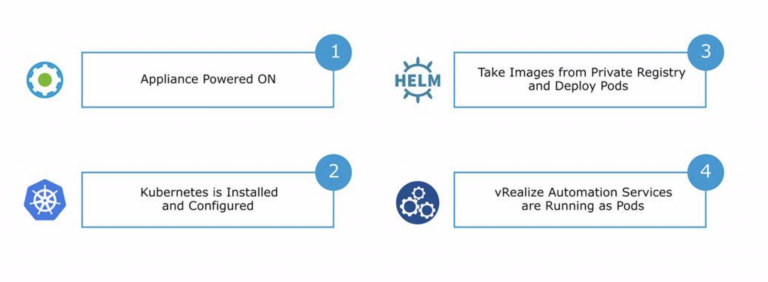
Helm ist ein Paketmanager für Kubernetes. Helm paketiert, konfiguriert und stellt Anwendungen und Dienste in Kubernetes-Clustern bereit. Die Konfiguration von Diensten wird im Kubernetes-eigenen Helm-Paketmanagerformat, Charts genannt, gespeichert. Ein Chart beschreibt einen Service in VCF Automation: seine Container, die Anzahl der Instanzen, Netzwerkeinstellungen, Persistenz usw. und wird in einem für Menschen lesbaren Textformat gespeichert. Helm verwendet Images, die in einer privaten Docker-Registry auf der Appliance gespeichert sind, und stellt Kubernetes-Dienste bereit, die als Pods ausgeführt werden. Alle zentralen VCF Automation-Dienste werden als Kubernetes-Pods innerhalb des Namensraums "prelude" ausgeführt. Namespaces sind eine Möglichkeit Kubernetes-Cluster-Ressourcen zwischen mehreren Benutzern aufzuteilen. VCF Automation verfügt über 16 containerisierte Kerndienste, von denen jeder seinen eigenen Webserver hat, der auf einem Kubernetes-Cluster läuft.
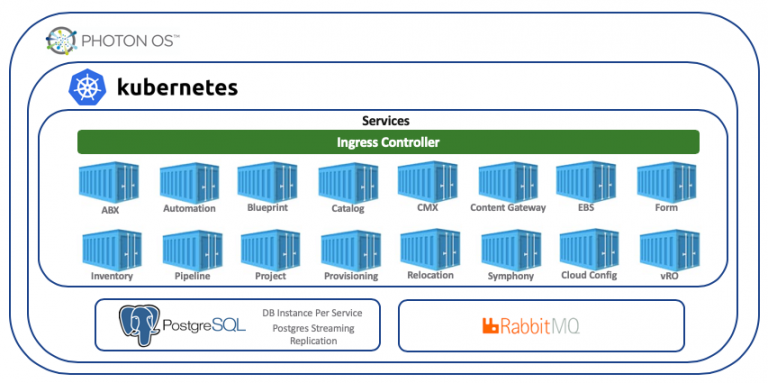
Erkundung der VCF Automation Architektur
- Stellen Sie über SSH eine Verbindung mit VCF Automation her.
- Führen Sie den Befehl
kubectl get pods -n preludeaus, um die laufenden Pods aufzulisten.
Ein Pod ist eine Gruppe von einem oder mehreren Containern, z. B. Docker-Container, mit gemeinsam genutztem Speicher/Netzwerk und einer Spezifikation für die Ausführung der Container. - Führen Sie den Befehl
kubectl get services -n preludeaus, um die laufenden Dienste aufzulisten.
Eine wichtige Aufgabe des Kubernetes-Dienstes besteht darin, den Netzwerkzugriff auf eine Reihe von Pods zu ermöglichen. - Führen Sie den Befehl
kubectl get deployments -n preludeaus, um die laufenden Deployments aufzulisten, die dafür verantwortlich sind dass eine Reihe von Pods ausgeführt wird.
Was zu beachten ist
VCF Automation kann nicht in seiner eigenen Kubernetes-Umgebung installiert werden. Es wird in Form einer Appliance mit allen notwendigen Teilen geliefert, die für die Ausführung von VCF Automation erforderlich sind, und nur so kann VMware es unterstützen. Neben den vier Kernkomponenten von VCF Automation, Assembler, Service Broker, Pipelines (ehemals Code Stream) und Orchestrator, werden zwei unterstützende Dienste wie Identity Manager und Lifecycle Manager benötigt, um VCF Automation zu installieren und auszuführen.Addendums
Stack
The following flow chart shows the stack of process steps from the programmed code to the CPU, which executes it.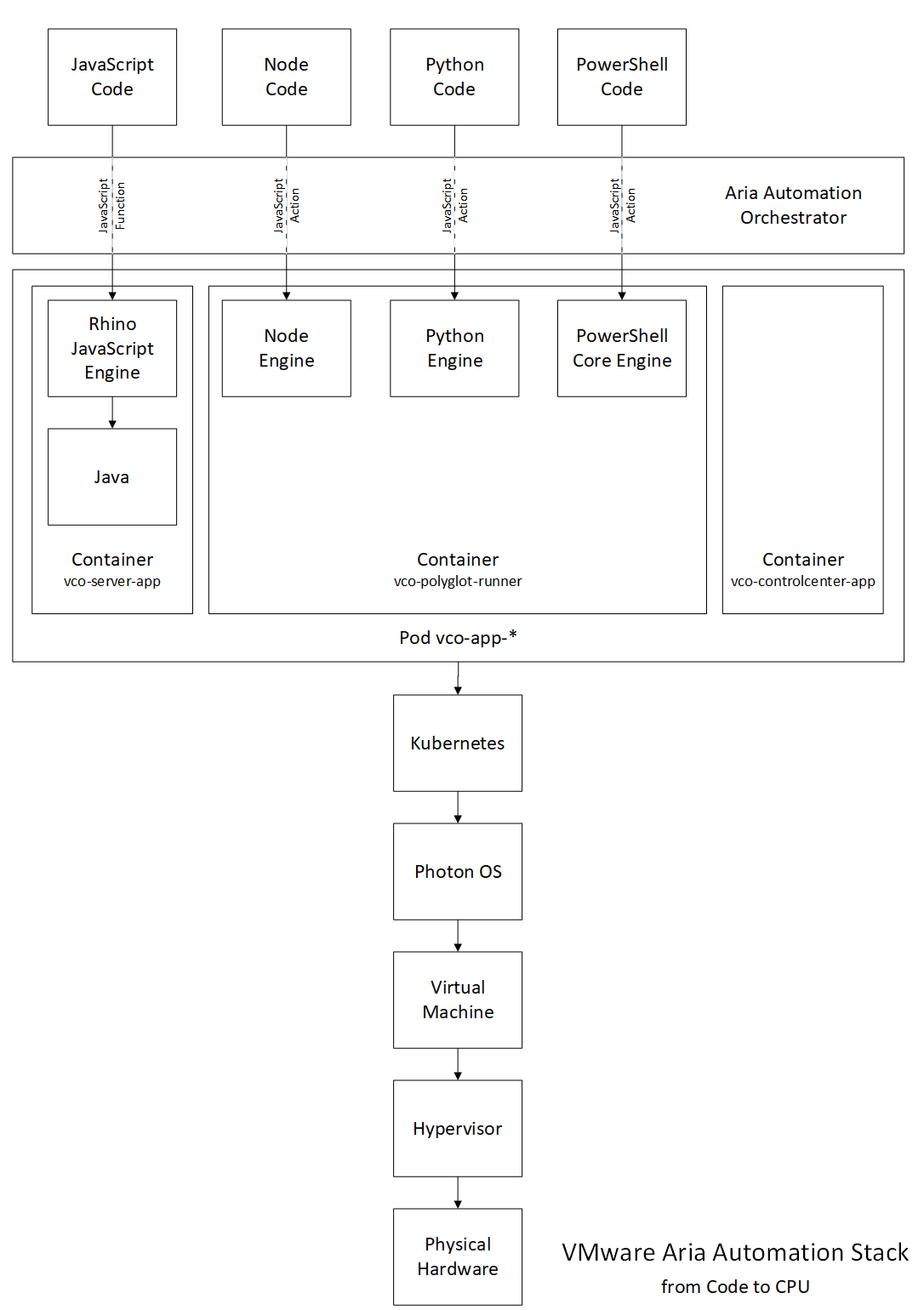
The cat (concatenate) command in Linux displays file contents. The file proc/1/cgroup shows the control group (cgroup) detail of init process. As will become clear below, the JavaScript runtime environment is executed in a container, we see the execution in Kubernetes.
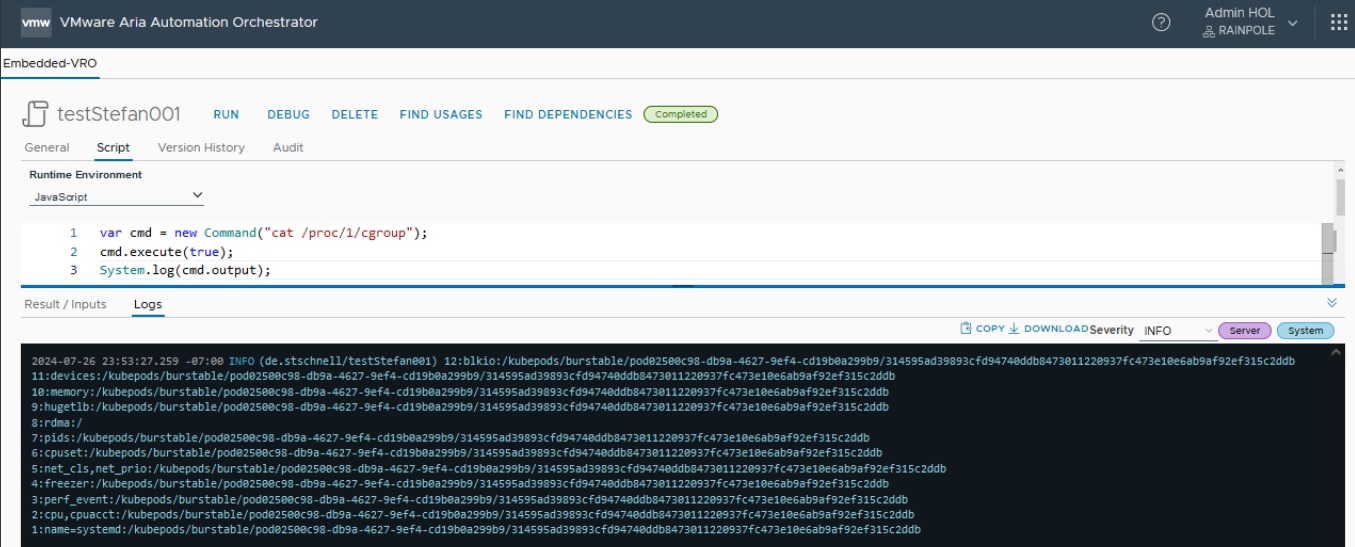
If the same command is executed in the console of the appliance, the result looks different.
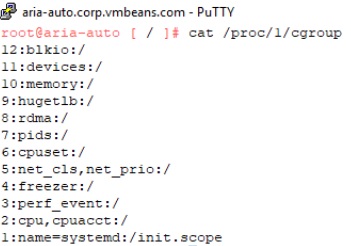
In the hands-on lab the following data was detected:
- host = vco-app-76dc8f9558-65t5t (Pod)
- namespace = prelude
- label app = vco-app
- node = aria-auto.corp.vmbeans.com
- container runtime is Docker
- contains three containers:
vco-polyglot-runner_private:latest
vco_private:latest (vco-server-app)
vco_private:latest (vco-contolcenter-app)
JavaScript
The execution of an action with the JavaScript runtime environment was logged as follows:
testJavaScript

  create action
  executeServerAction
  executeScript
  function

  executing action
  executeServerAction
  startAction
    executeScript
  end of action
The first block is for providing the code and the second block is for executing the code.Python
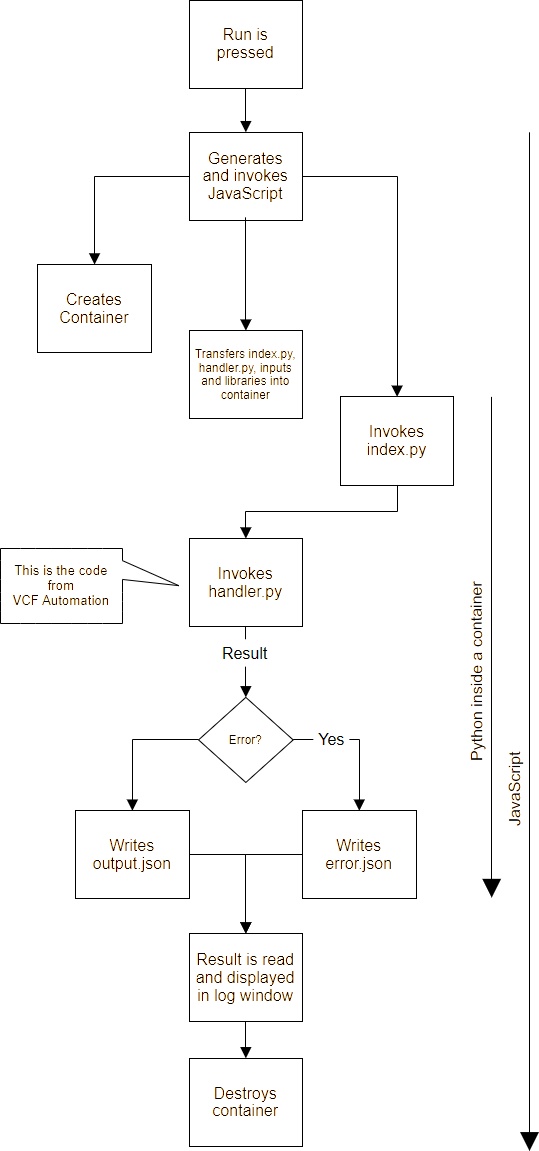
Please note: To execute a Python action in VCF Automation, a JavaScript action is automatically created, which is used to start the Python action.The execution of an action with the Python runtime environment was logged as follows:
testPython

  create action
  executeServerAction
  executeScript
  action module get

  executing action
  executeServerAction
  startAction
    executeScript
    action module get
    intercept dynamic function
    start action
      acquire memory (Polyglotrunner)
      creating container for script (Polyglotrunner)
      created container (Polyglotrunner)
      release memory (Polyglotrunner)
    end of action
  end of action
The first block is for providing the code and the second block is for executing the code.The second block clearly shows that a container is being created.
The steps for executing a Python action are shown below.
Below is an example of an index.py Python script.
|
Release Table
| Release | Date | Selected Comments from Release Note |
|---|---|---|
| 8.18.1 Update 6 | 2026-10-30 | |
| 9.1.1 Patch 2 | 2026-10-12 | |
| 9.1.1 | 2026-09-23 | Update of Rhino JavaScript engine release 1.9.1 |
| 8.18.1 Update 5 | 2026-05-27 | |
| 9.1 | 2026-05-12 | Update of Rhino JavaScript engine release 1.8.0 |
| 8.18.1 Update 4 | 2026-02-24 | |
| 9.0.2 | 2026-01-20 | |
| 9.0.1 | 2025-09-29 | |
| 8.18.1 Update 3 | 2025-07-29 | |
| 9.0 | 2025-06-17 | Aria Automation rebranded to VCF Automation, update of Rhino JavaScript engine release 1.7.15, deprecation of the Command class |
| 8.18.1 Update 2 | 2026-04-30 | |
| 8.18.1 | 2024-10-09 | Command class returns |
| 8.18 | 2024-07-23 | Dark mode added |
| 8.17 | 2024-05-14 | Deprecation of the Command class |
| 8.16.2 | 2024-03-21 | |
| 8.16.1 | 2024-02-29 | |
| 8.16 | 2024-01-16 | |
| 8.14.1 | 2023-11-28 | |
| 8.14 | 2023-10-19 | |
| 8.13.1 | 2023-09-07 | |
| 8.13 | 2023-08-03 | |
| 8.12.2 | 2023-06-29 | |
| 8.12.1 | 2023-05-18 | |
| 8.12 | 2023-04-20 | vRealize Automation rebranded to Aria Automation |
| 8.11.2 | 2023-03-21 | |
| 8.11.1 | 2023-02-21 | |
| 8.11 | 2023-01-19 | |
| 8.10.2 | 2022-12-06 | |
| 8.10.1 | 2022-11-08 | |
| 8.10 | 2022-10-12 | |
| 8.9.1 | 2022-09-26 | |
| 8.9 | 2022-08-22 | |
| 8.8.2 | 2022-07-28 | |
| 8.8.1 | 2022-06-17 | |
| 8.8 | 2022-04-28 | |
| 8.7 | 2022-03-22 | |
| 8.6.2 | 2022-01-18 | log4j Update |
| 8.6.1 | 2021-11-19 | |
| 8.6 | 2021-10-12 | |
| 8.5.1 | 2021-09-16 | |
| 8.5 | 2021-08-19 | |
| 8.4.2 | 2021-06-24 | |
| 8.4.1 | 2021-05-27 | |
| 8.4 | 2021-04-15 | |
| 8.3 | 2021-02-05 | |
| 8.2 | 2020-10-02 | |
| 8.1 | 2020-04-14 | Python, Node.js and PowerShell added in vRO, Multi-Tenancy |
| 8.0.1 | 2019-12-19 | |
| 8.0 | 2019-10-17 | Kubernetes container management, Git integration and API first approach |