Resource elements are external objects that can be imported into the VCF Orchestrator server, like image files, JSON files, XML templates, HTML files, etc. All actions and workflows can access and use them. This blog post presents an approach for embedding binary files within a JSON structure and enriching them with additional information. Furthermore, it enables to bundle different versions in one resource element with more individual information. This allows for more granular control and a higher flexibility over complex dependencies within automation.
JSON Resource Element as Container for Binary File
Any file can be imported into VCF Automation Orchestrator as a resource element.
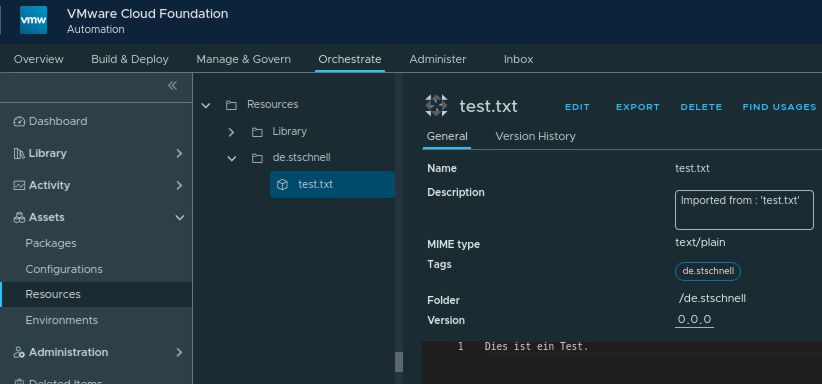
The following code snippet demonstrates how to easily export a resource element to the temporary directory using
writeResourceAsFileInTempDirectory function. Conversely, you can create or update a resource element from the temporary directory using
saveFileFromTempDirectoryAsResource function.
Under the hood, both functions rely on
getResourceElement to locate the target resource. The write function uses the standard
writeContentToFile method, while the save function
setContentFromFile, or falls back to
Server.createResourceElement if the resource is new. These native methods ensure that your file operations are simple, clean and safe.
/**
 *
 * @module de.stschnell
 *
 * @version 0.1.0
 *
 * @outputType void
 *
 */

/**
 * @author Stefan Schnell <mail@stefan-schnell.de>
 * @license MIT
 * @version 0.1.0
 *
 * Checked with Aria Automation 9.0
 */


function getResourceElement(
  resourceElementPath,
  resourceElementName
) {

  var resourceElement = null;

  try {

    const resourceElementCategory = Server.getResourceElementCategoryWithPath(
      resourceElementPath
    );
    if (!resourceElementCategory) {
      throw new Error("Category not found: " + resourceElementPath);
    }

    const resourceElements = resourceElementCategory.resourceElements;
    if (resourceElements) {
      for (var i = 0; i < resourceElements.length; i++) {
        if (resourceElements[i].name === resourceElementName) {
          resourceElement = resourceElements[i];
          break;
        }
      }
    }
    if (!resourceElement) {
      throw new Error("Resource element not found: " + resourceElementName);
    }

  } catch (exception) {
    System.error(exception);
  }

  return resourceElement;

}


function saveFileFromTempDirectoryAsResource(
  fileName,
  fileMimeType,
  resourcePath,
  resourceName
) {

  try {

    const tempDir = System.getTempDirectory();
    const fullPathName = tempDir + "/" + fileName;

    const file = new File(fullPathName);
    if (!file.exists) {
      throw new Error("File not found: " + fileName);
    }

    const resource = getResourceElement(resourcePath, resourceName);

    if (resource) {

      resource.setContentFromFile(fullPathName, fileMimeType);

    } else {

      Server.createResourceElement(
        resourcePath,
        resourceName,
        fullPathName,
        fileMimeType
      );

    }

    return true;

  } catch (exception) {
    System.error(exception);
  }

  return false;

}


function writeResourceAsFileInTempDirectory(
  resourcePath,
  resourceName,
  fileName
) {

  try {

    const resource = getResourceElement(resourcePath, resourceName);
    if (resource) {

      const tempDir = System.getTempDirectory();
      const fullPathName = tempDir + "/" + fileName;

      var file = new File(fullPathName);
      if (file.exists) {
        file.deleteFile();
      }

      resource.writeContentToFile(fullPathName);

      file = new File(fullPathName);
      if (file.exists) {
        return true;
      }

    }

  } catch (exception) {
    System.error(exception);
  }

  return false;

}


function main() {

  var result = writeResourceAsFileInTempDirectory(
    "de.stschnell",
    "test.txt",
    "test.txt"
  );

  System.log(result);

  result = saveFileFromTempDirectoryAsResource(
    "test.txt",
    "text/plain",
    "de.stschnell",
    "testNeu.txt"
  );

  System.log(result);

}


main();
|
If this simple approach is adequate, it should be used. But what if you need to maintain multiple versions of a file or enrich it with additional metadata, such as a hash value?
JSON Resource Element
It is possible to encode binary data using base64 and then store it as part of a JSON object. This approach allows for storing multiple different versions of files as an array of properties. Additional information can also be stored.
Below is an example. In addition to standard properties like name, description, MIME type and the file itself, in the property content, there are other properties as well. The file size and the SHA256 hash value have been added to verify the integrity of a file after an operation.
{
  "filename": "test.txt",
  "mimetype": "text/plain",
  "description": "This is a test",
  "data": [
    {
      "version": "latest",
      "sha256hash": "b628b3e219268baae065dac7a5608d9e688507f172869a782af56e93c9f1d619",
      "size": 30,
      "content": "RGllcyBpc3QgZWluIGVyd2VpdGVydGVyIFRlc3Qu"
    },
    {
      "version": "1.0.0",
      "sha256hash": "e7098f5fc987e60945967f1b02be425e359653454602df66105aad65d5fedccc",
      "size": 18,
      "content": "RGllcyBpc3QgZWluIFRlc3Qu"
    },
    {
      "version": "1.1.0",
      "sha256hash": "b628b3e219268baae065dac7a5608d9e688507f172869a782af56e93c9f1d619",
      "size": 30,
      "content": "RGllcyBpc3QgZWluIGVyd2VpdGVydGVyIFRlc3Qu"
    }
  ]
}
|
This approach allows actions and workflows to retrieve the resource element by its name and to get the binary content by specifying an explicit version. Whether the version is a number or another generic description is irrelevant. This example uses the value latest and several version numbers. The file name can be different from the name of the resource element. The options that can be derived from this are more like of a repository. It is possible to establish version specific relationships with binary data or to choose a generic description. Binary data can be exchanged seamlessly without requiring any code changes.
Below two actions to handle this approach. Their naming and calling syntax are very similar to those used with the standard above.
Write JSON Resource Element as File
/**
 *
 * @module de.stschnell
 *
 * @version 0.1.0
 *
 * @param {string} in_resourePath
 * @param {string} in_resourceName
 * @param {string} in_resourceVersion
 *
 * @outputType boolean
 *
 */

/**
 * @function writeResourceAsFileInTempDirectory
 *
 * @param {string} in_resourePath - Path name which contains the resource
 * @param {string} in_resourceName - Resource name which contains the content
 * @param {string} in_resourceVersion - Version of the resource
 * @returns {boolean} Indicates whether the file exists and is valid
 *
 * @author Stefan Schnell <mail@stefan-schnell.de>
 * @license MIT
 * @version 0.1.0
 *
 * @example
 * const resourcePath = "web-root";
 * const resourceName = "helloWorld.json";
 * const resourceVersion = "latest";
 * const result = System.getModule("de.stschnell")
 *   .writeResourceAsFileInTempDirectory(
 *   resourcePath,
 *   resourceName,
 *   resourceVersion
 * );
 * System.log("File exists: " + String(result));
 *
 * Hint:
 * In System Settings > Configuration Properties add the property
 * com.vmware.scripting.javascript.allow-native-object and set it to true.
 *
 * Checked with Aria Automation 8.18.4 and VCF Automation 9.0
 */

var _writeResourceAsFileInTempDirectory = {


  getHash : function(fileName) {

    var returnValue = null;

    try {

      const path = java.nio.file.Paths.get(fileName);
      const context = org.mozilla.javascript.Context.enter();

      try {
        const scope = context.initStandardObjects();
        var byteArray = context.jsToJava(
          java.nio.file.Files.readAllBytes(path),
          java.lang.Class.forName("[B")
        );
        var hashArray = context.jsToJava(
          java.security.MessageDigest.getInstance("SHA-256").digest(byteArray),
          java.lang.Class.forName("[B")
        );
        returnValue = String(java.math.BigInteger(1, hashArray).toString(16));
      } catch (exception) {
        System.error(exception)
      } finally {
        org.mozilla.javascript.Context.exit();
      }

    } catch (exception) {
      System.error(exception);
    }

    return returnValue;

  },


  main : function(resourcePath, resourceName, resourceVersion) {

    try {

      const resourceElementCategory = Server.getResourceElementCategoryWithPath(
        resourcePath
      );
      if (!resourceElementCategory) {
          throw new Error("Category not found: " + resourcePath);
      }

      const resourceElements = resourceElementCategory.resourceElements;
      var resource = null;
      if (resourceElements) {
        for (var i = 0; i < resourceElements.length; i++) {
          if (resourceElements[i].name === resourceName) {
            resource = resourceElements[i];
            break;
          }
        }
      }
      if (!resource) {
        throw new Error("Resource not found: " +  resourceName);
      }

      const resourceContent = resource.getContentAsMimeAttachment().content;
      const resourceData = JSON.parse(resourceContent);

      const fileName = resourceData.filename;
      const mimeType = resourceData.mimetype;
      const data = resourceData.data;
      const tempDir = System.getTempDirectory();
      const fullPathName = tempDir + "/" + fileName;

      const file = new File(fullPathName);
      if (file.exists) {
        file.deleteFile();
      }

      var sha256hash = null;
      var fileSize = -1;
      var contentBase64 = null;

      for (var i = 0; i < data.length; i++) {
        if (data[i].version === resourceVersion) {
          sha256hash = data[i].sha256hash;
          fileSize = data[i].size;
          contentBase64 = data[i].content;
          break;
        }
      }

      if (!contentBase64 || !sha256hash || fileSize === -1) {
        throw new Error("Data of resource not found");
      }

      const byteBuffer = new ByteBuffer(contentBase64);
      const mime = new MimeAttachment();
      mime.name = fileName;
      mime.mimeType = mimeType;
      mime.buffer = byteBuffer;
      mime.write(tempDir, null);

      const newFile = new File(fullPathName);
      if (!newFile.exists || newFile.length !== fileSize) {
        throw new Error("Resource as file not found");
      }

      newFileHash = _writeResourceAsFileInTempDirectory.getHash(fullPathName);
      if (newFileHash == sha256hash) {
        return true;
      } else {
        throw new Error("Hash of resource is not identical");
      }

    } catch (exception) {
      System.error(exception);
    }

    return false;

  }

}


if (
  in_resourcePath && String(in_resourcePath).trim() !== "" &&
  in_resourceName && String(in_resourceName).trim() !== "" &&
  in_resourceVersion && String(in_resourceVersion).trim() !== ""
) {
  return _writeResourceAsFileInTempDirectory.main(
    String(in_resourcePath).trim(),
    String(in_resourceName).trim(),
    String(in_resourceVersion).trim()
  );
} else {
  throw new Error(
    "in_resourcePath or in_resourceName or in_resourceVersion " +
    "argument can not be null"
  );
}
|
Save File as JSON Resource Element
/**
 *
 * @module de.stschnell
 *
 * @version 0.1.0
 *
 * @param {string} in_fileName
 * @param {string} in_fileMimeType
 * @param {string} in_fileDescription
 * @param {string} in_resourcePath
 * @param {string} in_resourceName
 * @param {string} in_resourceVersion
 * @param {boolean} in_resourceReplaceExisting
 *
 * @outputType boolean
 *
 */

/**
 * @function saveFileFromTempDirectoryAsResource
 *
 * @param {string} fileName - Name of the file saved as resource
 * @param {string} fileMimeType - MIME type of the file saved as resource,
 *   default application/octet-stream
 * @param {string} fileDescription - Description of the file saved as resource,
 *   default empty
 * @param {string} resourcePath - Path name of the resource
 * @param {string} resourceName - Name of the resource where the file should be saved
 * @param {string} resourceVersion - Version of the resource, default latest
 * @param {boolean} resourceReplaceExisting - Flag whether an existing resource
 *   be replaced, default false
 * @returns {boolean} Indicates whether the resource exists
 *
 * @author Stefan Schnell <mail@stefan-schnell.de>
 * @license MIT
 * @version 0.1.0
 *
 * @example
 * const fileName = "test.txt";
 * const fileMimeType = "text/plain";
 * const fileDescription = "This is a test.";
 * const resourcePath = "web-root";
 * const resourceName = "test.json";
 * const resourceVersion = "latest";
 * const resourceReplaceExisting = true;
 * const result = System.getModule("de.stschnell")
 *   .saveFileFromTempDirectoryAsResource(
 *   fileName,
 *   fileMimeType,
 *   fileDescription,
 *   resourcePath,
 *   resourceName,
 *   resourceVersion,
 *   resourceReplaceExisting
 * );
 * System.log("Resource created or modified: " + String(result));
 *
 * Hint:
 * In System Settings > Configuration Properties add the property
 * com.vmware.scripting.javascript.allow-native-object and set it to true.
 *
 * Checked with Aria Automation 8.18.4 and VCF Automation 9.0
 */

var _saveFileFromTempDirectoryAsResource = {


  getHash: function(byteArray) {

    if (!byteArray) {
      return null;
    }

    try {

      const msgDigest = java.security.MessageDigest.getInstance("SHA-256");
      const hashBytes = msgDigest.digest(byteArray);

     var hexString = "";
      for (var i = 0; i < hashBytes.length; i++) {
        var hex = java.lang.Integer.toHexString(0xFF & hashBytes[i]);
        if (hex.length === 1) {
          hexString += "0";
        }
        hexString += hex;
      }

      return String(hexString);

    } catch (exception) {
      System.error(exception);
    }

    return null;

  },


  main: function(
    fileName,
    fileMimeType,
    fileDescription,
    resourcePath,
    resourceName,
    resourceVersion,
    resourceReplaceExisting
  ) {

    try {

      const tempDir = System.getTempDirectory();
      const fullPathName = tempDir + "/" + fileName;

      const file = new File(fullPathName);
      if (!file.exists) {
        throw new Error("File not found");
      }

      const filePath = java.nio.file.Paths.get(fullPathName);
      const fileByteArray = java.nio.file.Files.readAllBytes(filePath);
      const base64Encoder = java.util.Base64.getEncoder();
      const fileBase64 = base64Encoder.encodeToString(fileByteArray);

      var resourceContentData = {
        "version": resourceVersion,
        "sha256hash": _saveFileFromTempDirectoryAsResource.getHash(fileByteArray),
        "size": file.length,
        "content": fileBase64
      };

      var resourceContent = {
        "filename": fileName,
        "mimetype": fileMimeType,
        "description": fileDescription,
        "data": [
          resourceContentData
        ]
      };

      var resourceElementCategory = Server.getResourceElementCategoryWithPath(
        resourcePath
      );
      if (!resourceElementCategory) {
        resourceElementCategory = Server.createResourceElementCategoryWithPath(
          resourcePath
        );
      }

      const resourceElements = resourceElementCategory.resourceElements;
      var resource = null;
      if (resourceElements) {
        for (var i = 0; i < resourceElements.length; i++) {
          if (resourceElements[i].name === resourceName) {
            resource = resourceElements[i];
            break;
          }
        }
      }

      var mimeAttachment = new MimeAttachment();
      mimeAttachment.name = resourceName;
      mimeAttachment.mimeType = "application/json";

      if (!resource) {
        mimeAttachment.content = JSON.stringify(resourceContent);
        Server.createResourceElement(
          resourceElementCategory.path,
          resourceName,
          mimeAttachment
        );
      } else {
        if (!resourceReplaceExisting) {
          resourceContent = JSON.parse(
            resource.getContentAsMimeAttachment().content
          );
          resourceContent.data.push(resourceContentData);
        }
        mimeAttachment.content = JSON.stringify(resourceContent);
        resource.setContentFromMimeAttachment(mimeAttachment);
      }

      return true;

    } catch (exception) {
      System.error(exception);
    }

    return false;

  }

};


if (
  in_fileName && String(in_fileName).trim() !== "" &&
  in_resourcePath && String(in_resourcePath).trim() !== "" &&
  in_resourceName && String(in_resourceName).trim() !== ""
) {

  var fileMimeType = "application/octet-stream";
  if (
    in_fileMimeType &&
    String(in_fileMimeType).trim() !== ""
  ) {
    fileMimeType = String(in_fileMimeType).trim();
  }

  var fileDescription = "";
  if (
    in_fileDescription &&
    String(in_fileDescription).trim() !== ""
  ) {
    fileDescription = String(in_fileDescription).trim();
  }

  var resourceVersion = "latest";
  if (
    in_resourceVersion &&
    String(in_resourceVersion).trim() !== ""
  ) {
    resourceVersion = String(in_resourceVersion).trim();
  }

  var resourceReplaceExisting = false;
  if (
    in_resourceReplaceExisting &&
    typeof in_resourceReplaceExisting === "boolean"
  ) {
    resourceReplaceExisting = in_resourceReplaceExisting;
  }

  return _saveFileFromTempDirectoryAsResource.main(
    String(in_fileName).trim(),
    fileMimeType,
    fileDescription,
    String(in_resourcePath).trim(),
    String(in_resourceName).trim(),
    resourceVersion,
    resourceReplaceExisting
  );
} else {
  throw new Error(
    "in_fileName or in_resourcePath or in_resourceName argument " +
    "can not be null"
  );
}
|
Example
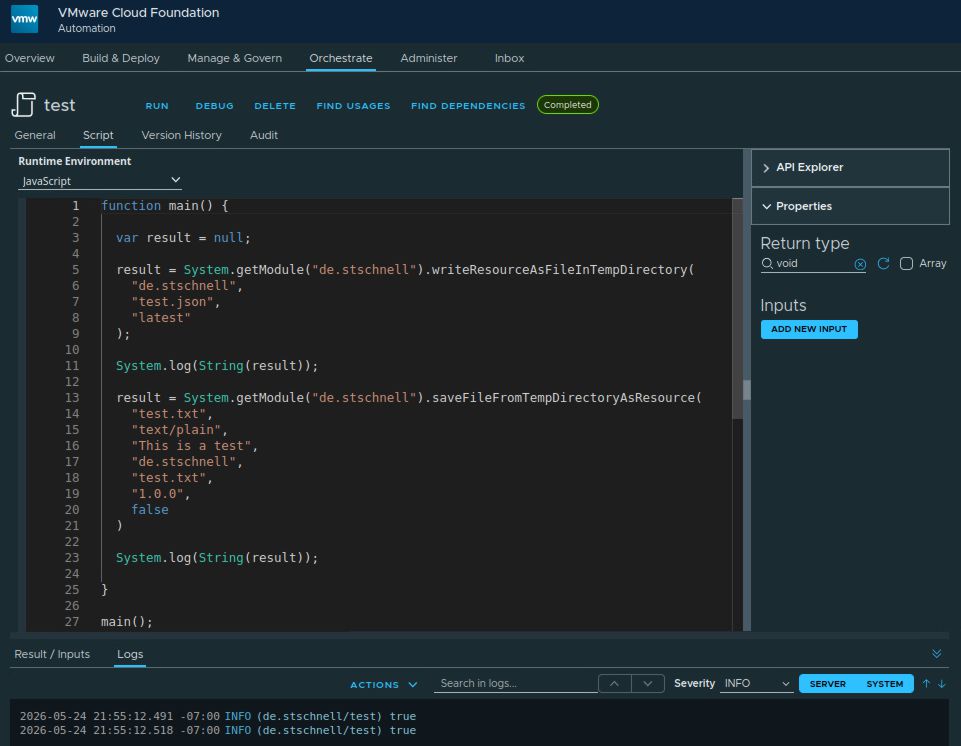
The following example writes the latest version of the file test.txt from the resource element test.json to the temporary directory. The file test.txt is then saved again as a new resource element. This provides an approach equivalent to the standard, but with expanded capabilities. File integrity is verified based on the size and hash value during writing.
function main() {

  var result = null;

  result = System.getModule("de.stschnell").writeResourceAsFileInTempDirectory(
    "de.stschnell",
    "test.json",
    "latest"
  );

  System.log(String(result));

  result = System.getModule("de.stschnell").saveFileFromTempDirectoryAsResource(
    "test.txt",
    "text/plain",
    "This is a test",
    "de.stschnell",
    "test.txt",
    "1.0.0",
    false
  );

  System.log(String(result));

}

main();
|
Conclusion
The approach presented here, which uses a JSON structure with base64 encoding for binary data, demonstrates that additional useful properties can be added to resource elements. These can be used during the processing, e.g. to verify file integrity or for other purposes (see below). The possibility of using a generic versioning description also opens up new perspectives. Overall, this transforms the simple static data storage of the resource elements into a more flexible and freely versionable mini-repository that offers enhanced protection against tampering attempts.
Future developments could include:
- In air-gapped environments, access to external repositories is often blocked, so this approach could also serve as a replacement for external repositories.
- Binary files and scripts can be encapsulated together with environment-specific variables in a single resource element.
- The JSON can be extended to include logical dependencies, to build a chain that can be processed by automation in a data-driven manner.
- The JSON does not necessarily have to contain only simple base64 encoding, but it could also be encrypted using a symmetric key, such as AES.
References