SQLite is a relational database software. It does not require a server, meaning it is serverless, unlike large databases such as PostgreSQL. Instead, the entire database is stored in a single file. SQLite can be embedded directly into an app, meaning that when the app is started, the database runs automatically alongside it. SQLite is small and consumes few resources, yet it is still fast and supports almost the full SQL language standard. It is a perfect database when data for single-user applications needs to be retrieved or stored quickly and easily. SQLite is included by default in the Python standard library, and the module is called sqlite3. Python, and by extension SQLite, is an integral part of the VCF Automation runtime environment, it opens up powerful possibilities. This blog post shows how SQLite databases can be seamlessly integrated into VCF Automation.
Integrate SQLite Database
In relational databases, large amounts of data can be stored consistently and queried quickly and easily using standardized SQL language. SQL stands for Structured Query Language and is a standard language used to store, modify, delete or retrieve data. It is a universal standard that is essentially identical across all databases.
In the context of VCF Automation, an SQL database can be used to store data from external sources that are not always reliably accessible. For example, it can be used as a fallback so that processing does not have to be interrupted because a third-party system is unreachable. Or, if retrieving data is particularly time-consuming, this can be eliminated by storing it locally.
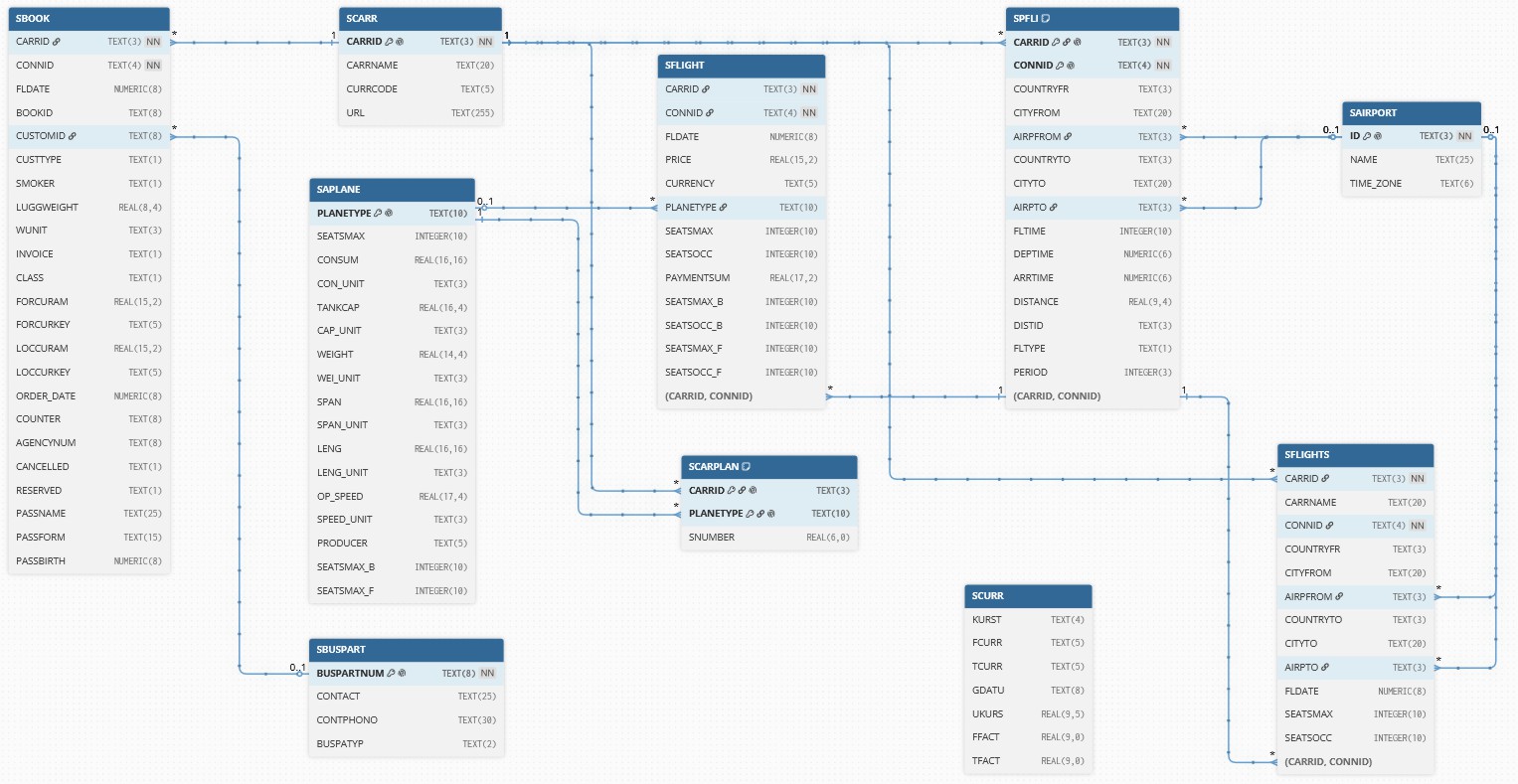
The SAP Flight Data Model, often simply referred to as the SFLIGHT model, is the essential training and demo data model in the SAP world. It is used in many ABAP courses where students practice programming on an SAP system. This model has been implemented in SQLite and is used here as an example. It consists of 10 tables containing over 100000 records, with a file size of 9.7 MByte. The tables are linked hierarchically, via foreign key relationships.
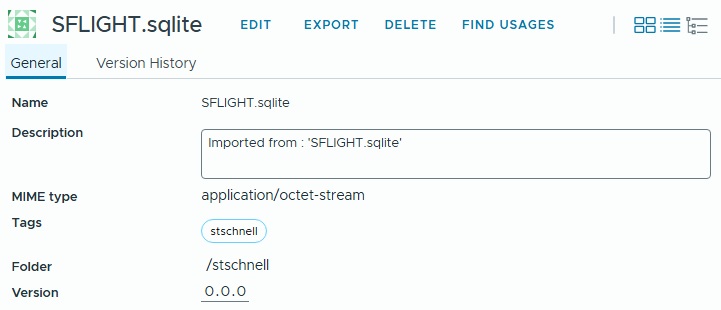
This database is simply stored as a resource element in VCF Automation.
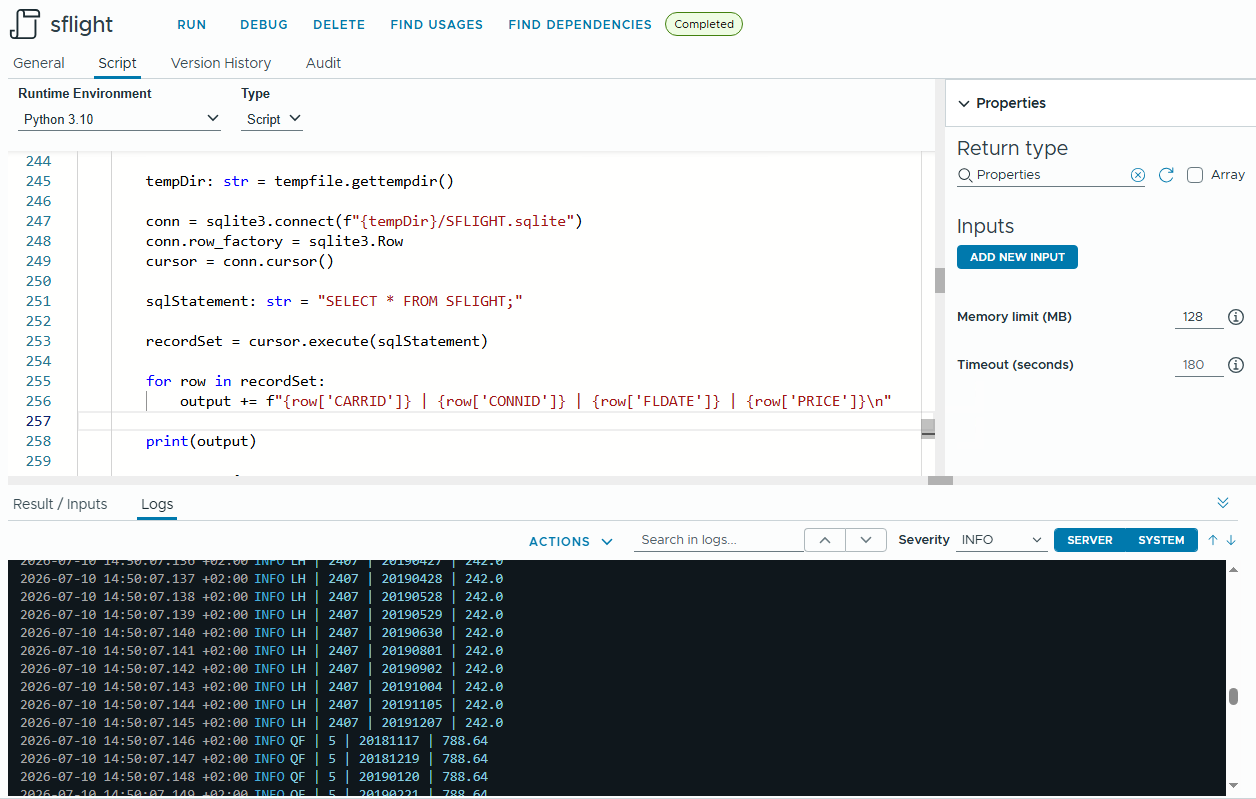
This database, as a resource element, can now be used in VCF Automation actions.
The code contains four functions: httpRequest to interact with the REST API of the VCF Orchestrator, getResource to retrieve the resource element, writeResourceAsFileInTempDirectory to write the resource element to the container's temporary directory when the action is executed and handler, the main Python function in the VCF Automation environment.
import base64
import json
import ssl
import http.client
from pathlib import Path
import sqlite3
import tempfile
import urllib.request


def httpRequest(
    url: str,
    user: str | None = None,
    password: str | None = None,
    bearerToken: str | None = None,
    method: str = "GET",
    body: dict = {},
    contentType: str = "application/json;charset=utf-8",
    accept: str = "application/json"
) -> dict | bytes:
    """ Executes a REST request

    @param {string} url - URL to execute the request
    @param {string} user
    @param {string} password
    @param {string} bearerToken
    @param {string} method - Method of request, e.g. GET, POST, etc
    @param {dictionary} body - Body of request
    @param {string} contentType - MIME type of the body for the request
    @param {string} accept - MIME type of response content
    @returns {dictionary | bytes}
    """

    returnValue: dict | bytes = {}

    try:

        request = urllib.request.Request(
            url = url,
            method = method,
            data = bytes(json.dumps(body).encode("utf-8"))
        )

        if user and password:
            authorization = base64.b64encode(
                bytes(user + ":" + password, "UTF-8")
            ).decode("UTF-8")
            request.add_header(
                "Authorization", "Basic " + authorization
            )

        if bearerToken:
            request.add_header(
                "Authorization", "Bearer " + bearerToken
            )

        request.add_header(
            "Content-Type", contentType
        )

        request.add_header(
            "Accept", accept
        )

        response = urllib.request.urlopen(
            request,
            context = ssl._create_unverified_context()
        )

        responseCode: int = response.status
        responseRead: bytes = response.read()

        if responseCode == 200:
            if len(responseRead) > 0:
                if "json" in accept:
                    returnValue = json.loads(responseRead)
                else:
                    returnValue = responseRead

    except Exception as err:
        raise Exception(f"An error occurred at request - {err}") \
          from err

    finally:
        if response:
            response.close()

    return returnValue


def getResource(
    vcoUrl: str,
    bearerToken: str,
    resourceFolder: str,
    resourceName: str,
    mimeType: str
) -> dict | bytes | None:
    """ Gets a resource

    @param {string} vcoUrl - URL of Aria orchestrator
    @param {string} bearerToken
    @param {string} resourceFolder - Path of the resource
    @param {string} resourceName - Name of the resource
    @param {string} mimeType - MIME type of the resource
    @returns {dictionary | bytes | None}
    """

    returnValue: dict | bytes | None = None

    try:

        resources: dict = httpRequest(
            url = vcoUrl + "/api/resources",
            bearerToken = bearerToken
        )

        found: bool = False
        resource: dict
        for resource in resources["link"]:
            id: str | None = None
            attribute: dict
            for attribute in resource["attributes"]:
                if attribute["name"] == "name" and \
                attribute["value"] == resourceName:
                    found = True
                if attribute["name"] == "id":
                    id = attribute["value"]

            if found == True and id != None:

                categoryId: str = httpRequest(
                    url = vcoUrl + "/api/resources/" + id,
                    bearerToken = bearerToken,
                    accept = \
                    "application/vnd.o11n.resource.metadata+json;charset=UTF-8"
                )["category-id"]

                categoryPath: str = httpRequest(
                    url = vcoUrl + "/api/categories/" + categoryId,
                    bearerToken = bearerToken
                )["path"]

                if categoryPath != resourceFolder:
                    found = False

            if found:
                break

        if id != None:

            returnValue = httpRequest(
                url = vcoUrl + "/api/resources/" + id,
                bearerToken = bearerToken,
                accept = mimeType
            )

    except Exception as err:
        raise ValueError(f"An error occurred at get resource id - {err}") \
            from err

    return returnValue


def writeResourceAsFileInTempDirectory(
    resource: bytes | dict | str,
    fileName: str
) -> bool:
    """ Writes a resource as file in the temporary directory

    @param {bytes | dict | str} resource
    @param {string} fileName
    @returns {bool}
    """

    tempDir: str = tempfile.gettempdir()
    filePath: Path = Path(tempDir) / fileName

    filePath.unlink(missing_ok = True)

    if isinstance(resource, bytes):
        with open(filePath, "wb") as file:
            file.write(resource)

    elif isinstance(resource, dict):
        with open(filePath, "w", encoding="utf-8") as file:
            json.dump(resource, file, indent=4)

    elif isinstance(resource, str):
        with open(filePath, "w", encoding="utf-8") as file:
            file.write(resource)

    else:
        raise TypeError(f"Unknown data type: {type(resource)}")

    if filePath.is_file():
        return True
    else:
        return False


def handler(context: dict, inputs: dict) -> dict:

    outputs: dict | None = None

    vcoUrl: str = context["vcoUrl"]
    bearerToken: str = context["getToken"]()

    resourceFolder: str = "stschnell"
    resourceName: str = "SFLIGHT.sqlite"
    mimeType: str = "application/octet-stream"

    resource: dict | bytes | None = None
    output: str = ""

    conn: sqlite3.Connection | None = None
    cursor: sqlite3.Cursor | None = None
    recordSet: sqlite3.Cursor | None = None

    try:

        resource = getResource(
            vcoUrl,
            bearerToken,
            resourceFolder,
            resourceName,
            mimeType
        )

        if resource is not None:

            writeSuccess: bool = writeResourceAsFileInTempDirectory(
                resource,
                resourceName
            )
            if not writeSuccess:
                raise IOError(f"Could not write file")

        else:

            raise FileNotFoundError("Resource not found")

        tempDir: str = tempfile.gettempdir()

        conn = sqlite3.connect(f"{tempDir}/SFLIGHT.sqlite")
        conn.row_factory = sqlite3.Row
        cursor = conn.cursor()

        sqlStatement: str = "SELECT * FROM SFLIGHT;"

        recordSet = cursor.execute(sqlStatement)

        for row in recordSet:
            output += (
                f"{row['CARRID']} | "
                f"{row['CONNID']} | "
                f"{row['FLDATE']} | "
                f"{row['PRICE']}\n"
            )

        print(output)

        outputs = {
            "status": "done",
            "error": None,
            "result": output
        }

    except Exception as err:

        outputs = {
            "status": "incomplete",
            "error": repr(err),
            "result": output
        }

    finally:
        if cursor:
            cursor.close()
        if conn:
            conn.close()

    return outputs
|
The process is simple: The SQLite database as resource element is retrieved and saved as a file in the Python container's temporary directory. This gives the running Python program access to the database. A connection to the database is established, the SQL statement is executed and the result is returned. In this example the SFLIGHT table is queried and the contents of some fields are displayed.
Conclusion
From certain perspectives, using an SQLite database can be beneficial for processing tasks in VCF Automation. This can be particularly useful when large amounts of data need to be retrieved from external systems. This is especially true when it is not always certain that the external system can be reached.
For Clarity of SQLite
SQLite was not developed as a competitor to enterprise databases, but as a replacement for direct read/write access to simple files.
To ensure it remains lightweight and maintenance-free, SQLite has no background process (server daemon). It is embedded directly as a library within the program code. Without a central server process to coordinate complex locking patterns, the file must be locked at the operating system level. This is the only way to prevent data corruption, which would limit its multi-user capabilities. SQLite is perfect for scenarios involving a lot of reading and very little writing, but it's not for scenarios with many concurrent writers.
To ensure that SQLite can guarantee the fastest possible latency for local data, all network overhead has been eliminated. Network protocols inherently introduce latency. However, because SQLite operates directly in the program's memory and reads data locally, queries are often faster than reading a regular file. This is essential for applications to respond smoothly and without delay. SQLite therefore does not use a client-server model, instead it is focused on local use.
To adhere to the "zero configuration" principle, there is no internal rights management. SQLite databases must be as portable as possible. A single file is copied from one system to another, and it works. Security is entirely delegated to the operating system. That is why user and permission management is non-existent by design.
The supposed drawbacks of SQLite are the price to pay to get an extremely fast, maintenance-free, single-file database that runs anywhere without installation. Taking these prerequisites into account, SQLite can be leveraged as a significant advantage in the context of VCF Automation.