In heterogeneous IT corporate landscapes, there is a wide variety of different hardware and software. When deploying virtual machines (VM), the requester does not necessarily need to know all the details. On which architecture is the VM running? Which version of Python is available in the VM? Such questions and similar ones sometimes arise and need to be answered. This post shows how specific information can be detected at runtime.
Get System Information
Two approaches are presented here: On the one hand a Python program and on the other hand an Ansible playbook. The Python program can be run in any Python environment. The Python runtime from VCF Automation was used as an example here. This also as addition to the approaches described in the reference, but there with other execution environments.
Detecting system information about existing hardware or software can be very important to correctly provide or address software components that are dependent on it.
Python
With the Python platform library and the os library some information are collected and made available in variables.
"""
@module de.stschnell

@version 0.1.0

@runtime python:3.11

@outputType Properties
"""

""" Collects some system information.

@author Stefan Schnell <mail@stefan-schnell.de>
@license MIT
@version 0.1.0

Checked with VCF Automation 9.0.0 from Orchestrator as action and from
CLI as Python program.
"""

import json
import os
import platform

def handler(context: dict, inputs: dict) -> dict:

    result: dict = {}
    outputs: dict = {}

    try:

        os_platform_name: str = os.name
        os_platform_system: str = platform.system()
        os_platform_release: str = platform.release()
        os_platform_machine: str = platform.machine()
        python_release: str = platform.python_version()
        linux_distribution_name: str = ""
        linux_distribution_version: str = ""

        if os_platform_system == "Linux":
            os_release_file = open("/etc/os-release", mode="r")
            os_release_content: str = os_release_file.read()
            os_release_file.close()
            for os_release_line in os_release_content.splitlines():
                if os_release_line.split("=")[0] == "NAME":
                    linux_distribution_name = \
                        os_release_line.split("=")[1].replace("\"", "")
                elif os_release_line.split("=")[0] == "VERSION":
                    linux_distribution_version = \
                        os_release_line.split("=")[1].replace("\"", "")

        result = {
            "os_platform_system": os_platform_system,
            "os_platform_name": os_platform_name,
            "os_platform_release": os_platform_release,
            "os_platform_machine": os_platform_machine,
            "python_release": python_release,
            "linux_distribution_name": linux_distribution_name,
            "linux_distribution_version": linux_distribution_version
        }

        outputs = {
            "status": "done",
            "error": None,
            "result": result
        }

    except Exception as err:

        outputs = {
            "status": "incomplete",
            "error": repr(err),
            "result": None
        }

    return outputs
|
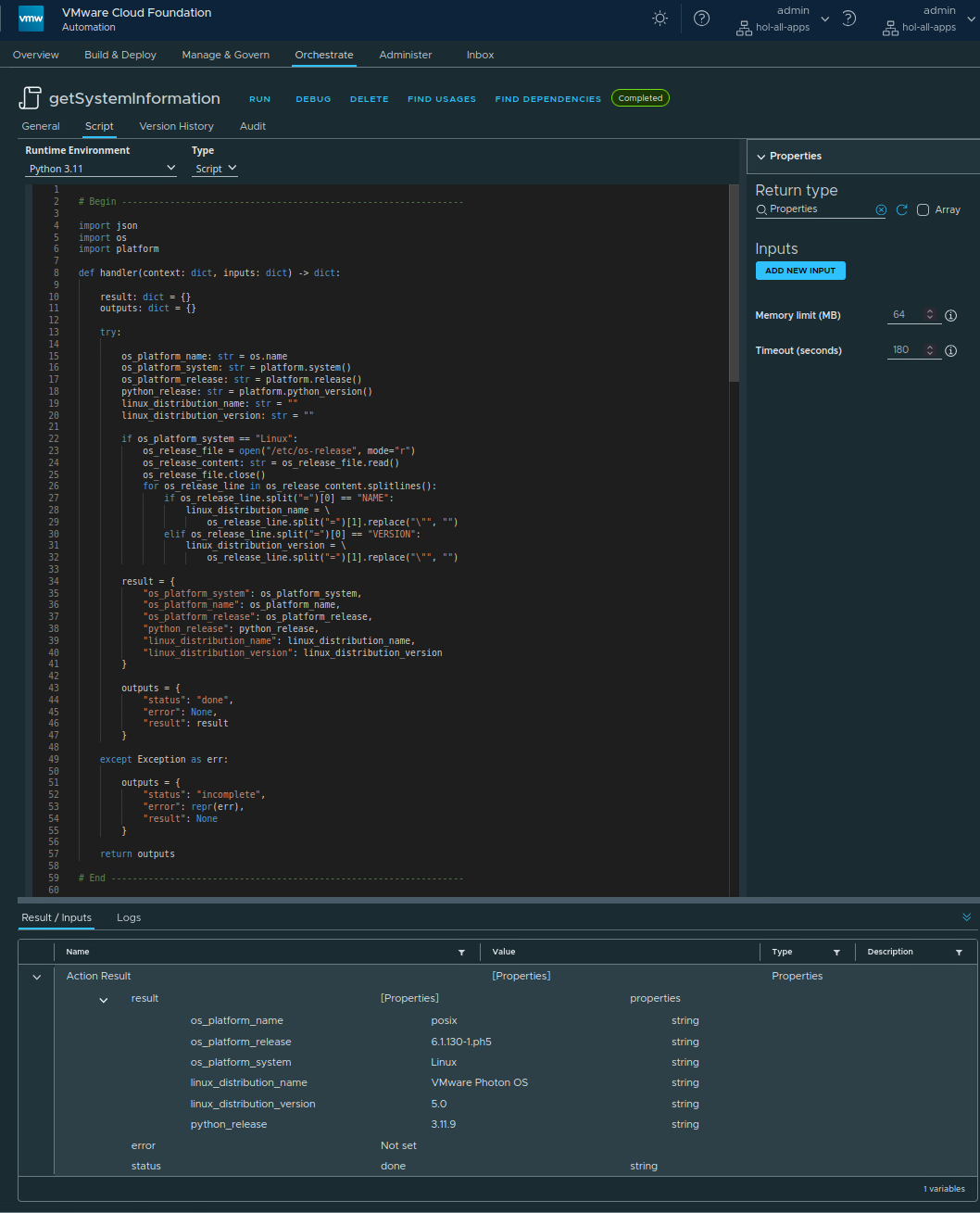
Ansible
In Ansible the gathered facts are used for the detection. The result is very similar to the Python approach. In addition further interesting information is also detected.
---

# Collect some system information of the managed node.
#
# @author Stefan Schnell <mail@stefan-schnell.de>

- name: Get system details of the managed host
  hosts: localhost
  gather_facts: true

  tasks:

    - name: Print Ansible version
      ansible.builtin.debug:
        msg: "ansible_version: {{ ansible_version.full }}"

    - name: Get OS platform system
      ansible.builtin.set_fact:
        os_platform_system: "{{ ansible_facts.system }}"

    - name: Print OS platform system
      ansible.builtin.debug:
        msg: "os_platform_system: {{ os_platform_system }}"

    - name: Print OS platfrom release
      ansible.builtin.debug:
        msg: "os_platform_release: {{ ansible_facts.kernel }}"

    - name: Print OS platform machine
      ansible.builtin.debug:
        msg: "os_platform_machine: {{ ansible_facts.architecture }}"

    - name: Print Python release
      ansible.builtin.debug:
        msg: "python_release: {{ ansible_facts.python_version }}"

    - name: Get Linux OS information
      when: os_platform_system == "Linux"
      block:

        - name: Get Linux OS information
          changed_when: os_details.rc != 0
          register: os_details
          ansible.builtin.command:
            cmd: cat /etc/os-release

        - name: Set Linux OS name variable
          loop: "{{ os_details.stdout_lines }}"
          when: item.split('=').0 == "NAME"
          ansible.builtin.set_fact:
            os_name: "{{ item.split('=').1 }}"

        - name: Print Linux OS name
          ansible.builtin.debug:
            msg: "linux_distribution_name: {{ os_name }}"

        - name: Set Linux OS version variable
          loop: "{{ os_details.stdout_lines }}"
          when: item.split('=').0 == "VERSION"
          ansible.builtin.set_fact:
            os_version: "{{ item.split('=').1 }}"

        - name: Print Linux OS version
          ansible.builtin.debug:
            msg: "linux_distribution_version: {{ os_version }}"


    - name: Get Bash version
      changed_when: bash_version.rc != 0
      register: bash_version
      ansible.builtin.command:
        cmd: bash --version

    - name: Print Bash version
      ansible.builtin.debug:
        msg: "{{ bash_version.stdout_lines.0 }}"


    - name: Call command whoami
      changed_when: whoami.rc != 0
      register: whoami
      ansible.builtin.command:
        cmd: whoami

    - name: Print whoami
      ansible.builtin.debug:
        msg: "{{ whoami.stdout_lines }}"


    - name: Get environment variables
      changed_when: environment_variables.rc != 0
      register: environment_variables
      ansible.builtin.command:
        cmd: printenv

    - name: Print environment variables
      ansible.builtin.debug:
        msg: "{{ environment_variables.stdout_lines }}"


    - name: Get Linux OS commands
      when: os_platform_system == "Linux"
      block:

        - name: Get commands from /usr/bin
          changed_when: commands.rc != 0
          register: commands
          ansible.builtin.command:
            cmd: ls /usr/bin

        - name: Print commands from /usr/bin
          ansible.builtin.debug:
            msg: "{{ commands.stdout_lines }}"
|
Conclusion
The detection of information during runtime offers several possibilities for responding flexibly to different hardware and software installations. Or only simply to know exactly what to be found.
References